Linux Kernel smatch
静的解析ツールsmatchでLinuxカーネルの関数コール情報を取得するまでの作業を記事にしました。
環境
- windows11
- Docker
- Ubuntu12.4
Docker
install
Ubuntu:12.4を起動
#powershell
docker run -it --name old-gcc-env ubuntu:12.04 /bin/bash
- コマンド捕捉
- docker run: imageからコンテナを作成して実行
- -it: powershellからコンテナ内のUbuntuのターミナルへ入力するためのオプション
- –name old-gcc-env: コンテナに名前を付ける
- ubuntu:12.04: イメージ
- /bin/bash: コンテナ起動時にbashを起動
停止後、再度実行する場合
#powershell
docker start -i -a old-gcc-env
- コマンド捕捉
- -i: コンテナへの標準入力を有効にする
- -a: コンテナからの標準出力を有効にする
- old-gcc-env: 実行するコンテナの名前
- ubuntu:12.04: イメージ
- /bin/bash: コンテナ起動時にbashを起動
コンテナのファイルをホスト(windows)にコピーする
#powershell
#xxxのフォルダをpowerhellのカレントフォルダにコピー
#ファイルでもOK
docker cp old-gcc-env:root/xxx .
ホスト(windows)のファイルをコンテナにコピーする
#powershell
#ホストのxxxファイルをコンテナのyyyフォルダにコピー
docker cp ./xxx old-gcc-env:yyy
apt参照先を変更
# sh
# 参照先を old-releases.ubuntu.com に書き換え
sed -i 's/archive.ubuntu.com/old-releases.ubuntu.com/g' /etc/apt/sources.list
sed -i 's/security.ubuntu.com/old-releases.ubuntu.com/g' /etc/apt/sources.list

# アップデートを実行
apt-get update
- コマンド捕捉
- sed: 文字列編集コマンド
- -i: 表示をオフ
- s/A/B/g: sは置換、Aは検索文字列、Bは置き換える文字列、gは行内の一致
Linux Kernelのビルドに必要なツール
以下の公式ドキュメントを参考にしてツールをインストールしていますが、この記事では使用していないツールもあります。
https://docs.kernel.org/process/changes.html#current-minimal-requirements
#sh
apt-get install -y gcc
apt-get install -y make
apt-get install -y binutils
apt-get install -y wget
apt-get install -y openssl
apt-get install -y tar
apt-get install libncurses5-dev
作業ディレクトリの作成
#sh
mkdir ~/workspace_my_linux && cd ~/workspace_my_linux
Linux Kernel
自作のLinuxに組み込むカーネルを設定してビルドします。
Linux Kernelのソースをダウンロード
以下のサイトにダウンロードできるバージョン一覧があります。
https://cdn.kernel.org/pub/linux/kernel/
この記事ではv3.0.5をダウンロードします。
#sh
cd ~/workspace_my_linux
wget https://cdn.kernel.org/pub/linux/kernel/v3.0/linux-3.0.5.tar.xz
Linux Kernelのソースを解凍
#sh
tar -xvf linux-3.0.5.tar.xz
最小設定のコンフィグファイルを作成
#sh
cd linux-3.0.5
make allnoconfig
allnoconfigはLinux Kernelのmakefileにターゲットとして定義されています。 https://docs.kernel.org/kbuild/kconfig.html
Linux Kernelの設定
menuconfig
#sh
make menuconfig
menuconfigで以下を設定します。
- General Setup
- kernel compression mode: Gzip
- Default hostname: My_Linux
- Initial RAM filesystem and RAM disk (initramfs/initrd) support: Yes
- Configure standard kernel features (expert users): yes
- Processor type and features
- Build a relocatable kernel: No
- Executable file formats
- Kernel support for ELF binaries: Yes
- Device Driver
- Generic Driver Options
- Maintain a devtmpfs filesystem to mount at /dev: Yes
- Automount devtmpfs at /dev, after the kernel mounted the rootfs: yes
- Character devices
- Serial Drivers
- 8250/16550 and compatible serial support: Yes
- Console on 8250/16550 and compatible serial port: Yes
- Serial Drivers
- Generic Driver Options
- File systems
- Pseudo filesystems
- /proc file system support: Yes
- /sysfs file system support: Yes
- Pseudo filesystems
セーブしてコンフィグメニューから抜けます。 .configが更新されます。
Linux Kernelをビルド
#sh
make
ビルドができたらsmatchによる静的を実行できる準備が完了です。
smatch
Linuxカーネルで使用される静的解析ツールです。 https://github.com/error27/smatch/blob/master/Documentation/smatch.rst
smatchをclone
#sh
cd ~
apt-get install -y git sqlite3 libsqlite3-dev libtry-tiny-perl libdbd-sqlite3-perl libssl-dev
GIT_SSL_NO_VERIFY=true git clone https://github.com/error27/smatch.git
cd smatch
# 記載時の最新コミット
git checkout 2614ff1a041f0bff0a647f84df7fa4427a84c015
smatchの修正
古い環境で最新のsmatchを使用します。
しかし、そのままだとエラーが発生して解析できません。
以下の対応を行います。
smatchパッチ
修正を以下のgitのパッチにまとめています。
Makefileを修正
121行目付近のcflagsにC99のオプションを追加する。
diff --git a/Makefile b/Makefile
index f5e4929..ad107bc 100644
--- a/Makefile
+++ b/Makefile
@@ -121,7 +121,7 @@ all:
 # common flags/options/...

 cflags = -fno-strict-aliasing
-cflags += -Wall -Wwrite-strings -Wno-switch -Wno-psabi
+cflags += -Wall -Wwrite-strings -Wno-switch -Wno-psabi -std=gnu99
修正しない場合に発生するエラー
smatch_kernel_host_data.c: In function 'get_host_data_fn_param':
smatch_kernel_host_data.c:157:2: error: 'for' loop initial declarations are only allowed in C99 mode
builtin.cを修正
279,709行目付近のclrsbをコメントアウトする。
- Geminiによる解説 clrsb(Count Leading Redundant Sign Bits)は、符号ビットの冗長性をカウントする特殊な関数です。Linux カーネル 3.0.5 の解析において、この特定の組み込み関数が Smatch でサポートされていなくても、解析全体に大きな支障が出ることはまずありません。
diff --git a/builtin.c b/builtin.c
index 9e8fa59..4d08199 100644
--- a/builtin.c
+++ b/builtin.c
@@ -279,7 +279,7 @@ static struct symbol_op name##_op = {                               \

 EXPAND_FINDBIT(clz);
 EXPAND_FINDBIT(ctz);
-EXPAND_FINDBIT(clrsb);
+//EXPAND_FINDBIT(clrsb);
 EXPAND_FINDBIT(ffs);
 EXPAND_FINDBIT(parity);
 EXPAND_FINDBIT(popcount);
@@ -709,9 +709,9 @@ static const struct builtin_fn builtins_common[] = {
        { "__builtin_bswap64", &ullong_ctype, 0, { &ullong_ctype }, .op = &bswap_op },
        { "__builtin_bzero", &void_ctype, 0, { &ptr_ctype, size_t_ctype }},
        { "__builtin_calloc", &ptr_ctype, 0, { size_t_ctype, size_t_ctype }},
-       { "__builtin_clrsb", &int_ctype, 0, { &int_ctype }, .op = &clrsb_op },
-       { "__builtin_clrsbl", &int_ctype, 0, { &long_ctype }, .op = &clrsb_op },
-       { "__builtin_clrsbll", &int_ctype, 0, { &llong_ctype }, .op = &clrsb_op },
+//     { "__builtin_clrsb", &int_ctype, 0, { &int_ctype }, .op = &clrsb_op },
+//     { "__builtin_clrsbl", &int_ctype, 0, { &long_ctype }, .op = &clrsb_op },
+//     { "__builtin_clrsbll", &int_ctype, 0, { &llong_ctype }, .op = &clrsb_op },
        { "__builtin_clz", &int_ctype, 0, { &int_ctype }, .op = &clz_op },
        { "__builtin_clzl", &int_ctype, 0, { &long_ctype }, .op = &clz_op },
        { "__builtin_clzll", &int_ctype, 0, { &llong_ctype }, .op = &clz_op },
修正しない場合に発生するエラー
libsparse.a(builtin.o): In function `expand_clrsb':
/root/smatch/builtin.c:282: undefined reference to `__builtin_clrsb'
/root/smatch/builtin.c:282: undefined reference to `__builtin_clrsbll'
collect2: ld returned 1 exit status
make: *** [compile] Error 1
解析プログラムのsqlインサート文を修正
smatch_db.cなどで解析結果をsqliteに出力するためのsql文をsql_insert関数で作成する。 しかし、出力パラメータの一部が’‘で囲めておらず、sqliteでエラーとなる。
以下の3ファイルを修正する。
- smatch_db.c
- smatch_mtag.c
- smatch_units.c
3ファイルとも以下のように「0x%llx」を「’0x%llx’」に修正する。
diff --git a/smatch_db.c b/smatch_db.c
index e1f7e32..c9e6826 100644
--- a/smatch_db.c
+++ b/smatch_db.c
@@ -296,7 +296,7 @@ void sql_insert_return_states(int return_id, const char *return_ranges,
        else
                id = __fn_mtag;

-       sql_insert(return_states, "0x%llx, '%s', %llu, %d, '%s', %d, %d, %d, '%s', '%s'",
+       sql_insert(return_states, "'0x%llx', '%s', %llu, %d, '%s', %d, %d, %d, '%s', '%s'",
                   get_base_file_id(), get_function(), id, return_id,
                   return_ranges, is_local(cur_func_sym), type, param, key, value);
 }
修正コマンドの例
#sh
cd /root/smatch
sed -i "s/0x%llx/'0x%llx'/g" ./smatch_db.c
sed -i "s/0x%llx/'0x%llx'/g" ./smatch_mtag.c
sed -i "s/0x%llx/'0x%llx'/g" ./smatch_units.c
修正しない場合に発生するエラー
# "0x340ee0837437c564"はファイルのハッシュ値で様々な値が大量に出力される。
# smatch.h sql_insert_helperで出力されるエラーログ。
SQL error #2: unrecognized token: "0x340ee0837437c564"
fixup_kernel.shを修正
sql文で#によるコメントを/**/に変更する。
古いsqliteでは#によるコメントがエラーとなるため。
diff --git a/smatch_data/db/fixup_kernel.sh b/smatch_data/db/fixup_kernel.sh
index f76af0e..e45632b 100755
--- a/smatch_data/db/fixup_kernel.sh
+++ b/smatch_data/db/fixup_kernel.sh
@@ -77,9 +77,9 @@ delete from caller_info where function = '(struct inet6_protocol)->handler' and
 delete from caller_info where function = 'do_dentry_open param 2' and type = 8017;
 delete from caller_info where function = 'do_dentry_open param 2' and type = 9018;
 delete from caller_info where function = 'param_array param 7' and type = 9018;
-# this is just too complicated for Smatch.  See how snd_ctl_find_id() is called.
+/* this is just too complicated for Smatch.  See how snd_ctl_find_id() is called. */
 delete from caller_info where function = 'snd_ctl_notify_one' and type = 8017;
-#temporary.  Just to fix recursion
+/* temporary.  Just to fix recursion */
 delete from caller_info where caller = 'ecryptfs_mkdir' and type = 8017;
 delete from caller_info where caller = 'rpm_suspend' and type = 8017;
 delete from return_states where function = 'rpm_resume' and type = 8017;
修正しない場合に発生するエラー
root@7d78c3b283b7:~/workspace_my_linux/linux-3.0.5# ~/smatch/smatch_scripts/build_kernel_data.sh
2147483646
off
off
Error: near line 68: unrecognized token: "#"
Error: near line 70: near "#temporary": syntax error
Hm... Not working.  Make sure you have all the sqlite3 packages
And the sqlite3 libraries for Perl and Python
smatchをビルド
make
smatchで解析
#sh
cd ~/workspace_my_linux/linux-3.0.5
~/smatch/smatch_scripts/build_kernel_data.sh
デバッグ出力を有効にしたい場合
#sh
~/smatch/smatch_scripts/build_kernel_data.sh --debug
smatch解析結果をホスト(windows)にコピー
# powershell
# powerhsellを起動したフォルダにsmatch解析結果をコピー
docker cp old-gcc-env:root/workspace_my_linux/linux-3.0.5/smatch_db.sqlite .
docker cp old-gcc-env:root/workspace_my_linux/linux-3.0.5/smatch_warns.txt.caller_info .
- smatch_db.sqlite 解析結果が記録されたsqliteデータベース。
- smatch_warns.txt.caller_info 関数コールのSQLインサート情報。smatch_db.sqliteのcaller_infoテーブルではファイル名がハッシュ化されており、smatch_warns.txt.caller_infoでハッシュとファイル名を確認する必要がある。
smatch_db.sqliteをcsv出力
vscodeで以下のエクステンションをインストールする。 https://marketplace.visualstudio.com/items?itemName=alexcvzz.vscode-sqlite
インストールが完了したら、コマンドパレットで「>SQlite: open Database」を実行してsmatch_db.sqliteを開く。

vscodeのEXPLORERに開いたDBが表示される。
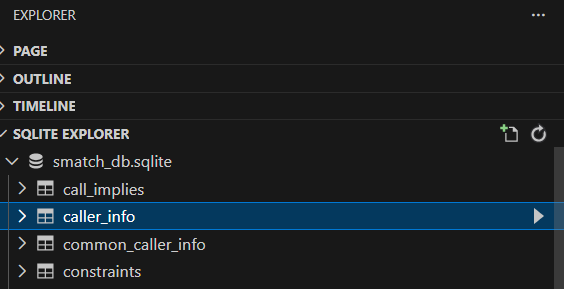
「▶: Show Table」を実行するとテーブルが表示される。
以下は「caller_info」テーブルを表示。
赤枠からcsv出力できる。
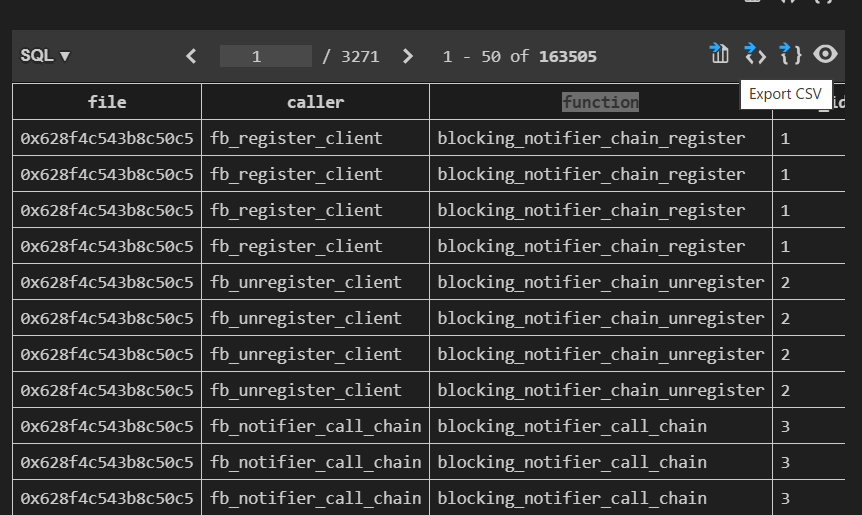
- file: ファイルのハッシュ。ファイル名はsmatch_warns.txt.caller_infoで確認する。
- caller: 呼び出し元の関数
- function: callerが呼び出している関数
出力した解析結果です。
解析結果の正しさはコードと付き合わせて確認が必要ですが、grepしながら関数コールを辿るより楽になると思います。